This is a browser extension that lets you send individual browser tabs or all URLs matching certain patterns to your ArchiveBox instance for offline preservation. This has a couple of benefits:
- Own your data: save the web content that matters to you most, protect against link rot
- Protect your data: save offline copies of pages in common, durable formats that will last for generations
- Use your data: collect and tag important bookmarks, full-text search through your browsing history, automatically push captured data into other systems using ArchiveBox's APIs
 Chrome / Brave / Other Chromium-based browsers
 Firefox / Waterfox / Tor Browser / Other Firefox-based browsers
- Microsoft Edge
 Safari / iOS Safari (bundled inside ArchiveBox.app for iOS/macOS)
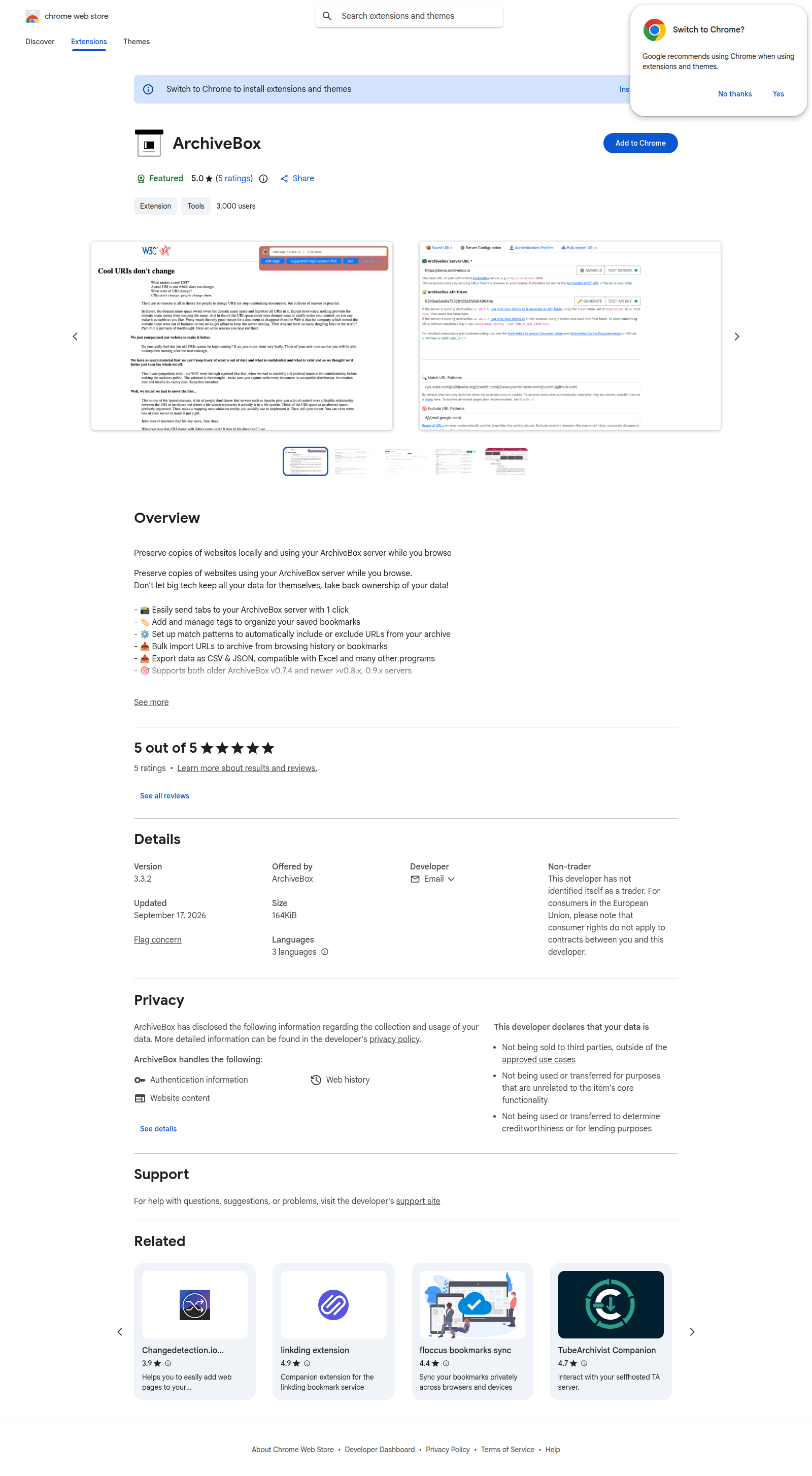
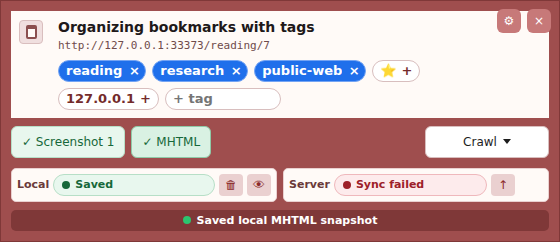
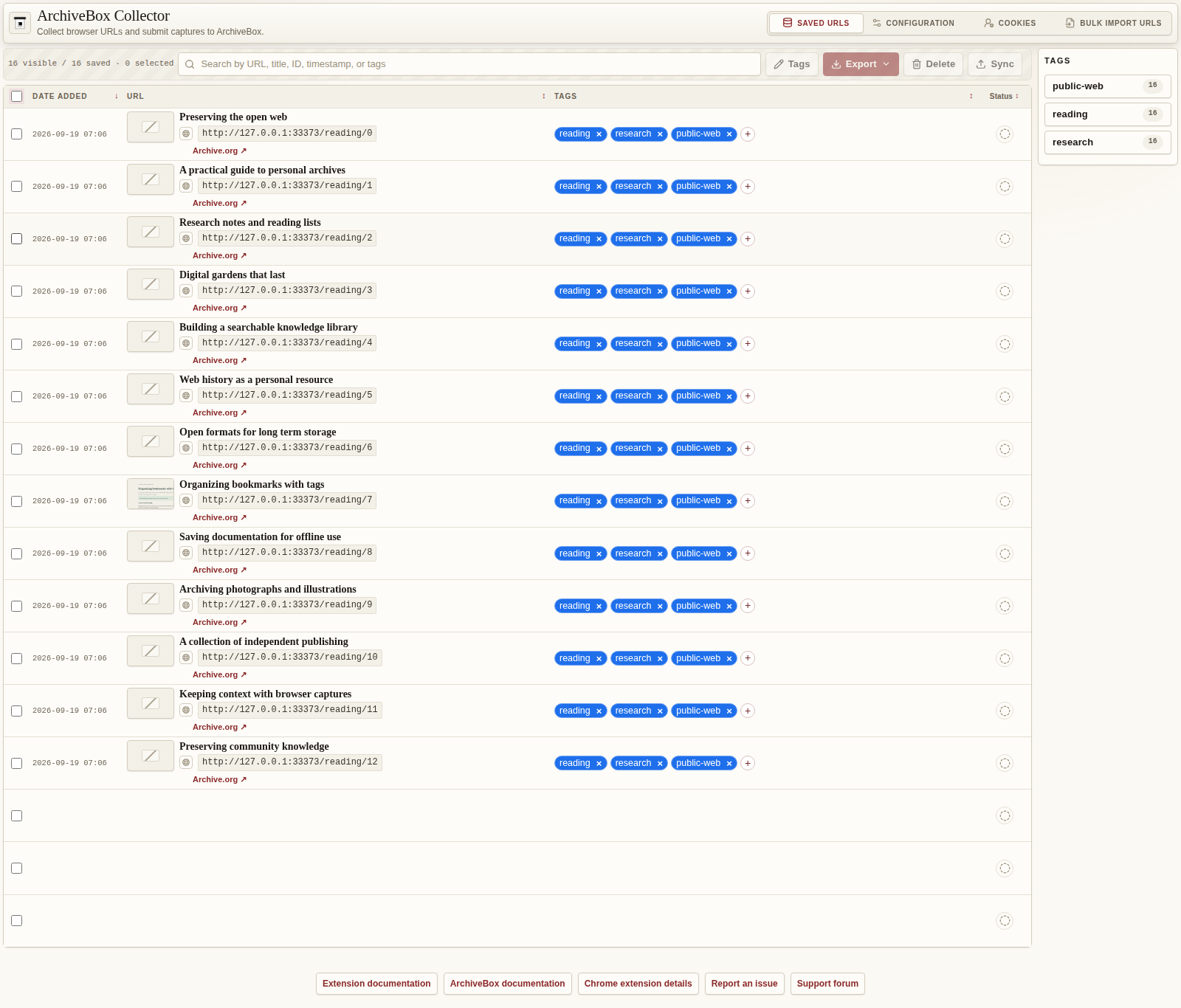
- 📸 Save the current page with the toolbar button, keyboard shortcut, or right-click menu.
- 🏛️ Send URLs to your own ArchiveBox server to preserve websites for later.
- 🏷️ Search, sort, tag, and manage your saved URLs in one place.
- ⚙️ Automatically archive pages that match your chosen URL patterns, with allowlists and denylists.
- 📥 Review and bulk import URLs from browser history or bookmarks on Chrome, Edge, and Firefox.
- 🧭 Import Safari bookmarks, Reading List, and history from Safari's exported ZIP, HTML, or JSON files.
- 🖼️ Keep local screenshots, including full-page captures when permission is granted.
- 📄 Save local MHTML copies of pages. (Chrome and Edge.)
- 📑 Save HTML copies with the optional SingleFile extension installed and connected.
- 📤 Export saved URLs as CSV or JSON, screenshots as PNG, page captures as HTML or MHTML, or everything together in a ZIP.
- 👤 Choose cookies and browser settings to sync to an ArchiveBox authentication profile for sites that require a login.
- 🧹 Choose how long to keep local copies, including cleanup after successful submission to your server.
- 🌐 Use the extension in English, Spanish, or Simplified Chinese.
Safari does not expose bulk bookmarks or history through its WebExtension APIs. Use Apple's browsing data export: on Mac choose File → Export Browsing Data to File; on iPhone/iPad choose Settings → Apps → Safari → Export. Select bookmarks, Reading List, and history as available.
In Extension options → Bulk Import URLs, choose which Safari data to import and the history date range, then select the exported ZIP (or extracted HTML/JSON files). Review the URLs, select the ones to keep, and click Import Selected. Existing saved URLs are marked as duplicates. History retains its original visit time. Files are parsed locally, passwords/payment cards are ignored, and imports enter the same saved URL list used by the other import sources. Use the existing Sync actions to submit them to your server.
When local capture saving is enabled in the options page, the extension stores capture artifacts in the browser's extension-local OPFS storage before the popup is shown:
- Full-page screenshot:
snapshots/YYYYMMDD/example.com/{uuid}/chrome_extension_screenshot/screenshot.png - MHTML snapshot:
snapshots/YYYYMMDD/example.com/{uuid}/chrome_mhtml/snapshot.mhtml
Local copies in OPFS are removed after 30 days by default; you can configure the extension to keep them indefinitely or remove them as soon as the server receives the URL.
- Set up an ArchiveBox server and make sure it's accessible to the machine you're browsing on
- In ArchiveBox 0.9.0, open Admin → API → API Keys → Create an API Key, create a key, and copy it.
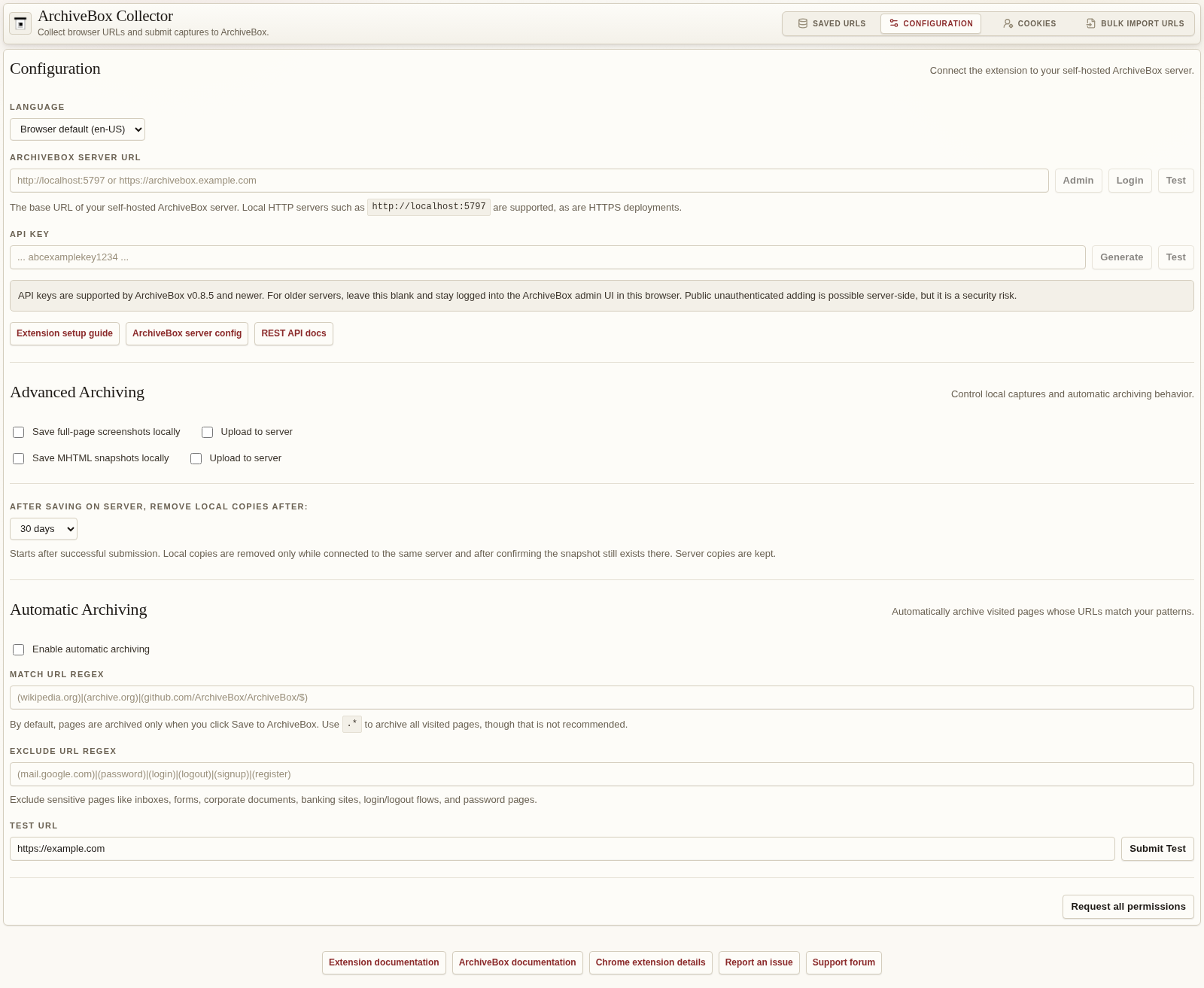
- Open Extension options → Configuration, paste the key into API Key, and enter your ArchiveBox server URL (e.g.
https://archivebox.example.com) in Server URL. Save the configuration and test the connection. - ✅ Test it out by right-clicking on any page and selecting
Save to ArchiveBox, or by clicking the extension icon in the menubar.
✨ Originally contributed by TJ Horner (@tjhorner), now maintained by @benmuth and the ArchiveBox team.
If you wish to contribute to (or just build for yourself) this extension, you will need to download and install Node.js and pnpm.
git clone https://github.com/ArchiveBox/archivebox-browser-extension
cd archivebox-browser-extension/

pnpm install
pnpm compile
pnpm build
pnpm build:edge
pnpm build:firefox
pnpm build:safari
For local development:
pnpm dev           # Chrome / Chromium
pnpm dev:edge      # Edge
pnpm dev:firefox   # Firefox
pnpm dev:safari    # Safari WebExtension build
For a production-style local build, load .output/chrome-mv3 into Chrome / Chromium using the Load Unpacked Extension UI, load .output/edge-mv3 into Edge using edge://extensions, load .output/firefox-mv3 into Firefox using about:debugging, or load .output/safari-mv3 in Safari with Settings → Developer → Add Temporary Extension.
To verify local retention with real server responses and the real one-minute clock, start a disposable ArchiveBox server without archive workers (so submissions remain queued), build the extension, and run:
ARCHIVEBOX_TEST_SERVER=http://127.0.0.1:5797 \
ARCHIVEBOX_TEST_KEY_FILE=/path/to/disposable-server-api-key \
node scripts/test-retention-live.mjs
The live test imports bookmarks through the options UI, submits them, checks disconnected/missing-server preservation, verifies OPFS and metadata deletion, restarts the service worker, and waits for automatic expiration after resubmission. It creates server test records and deletes one of its own records to test a missing snapshot; use a disposable collection. UI default/persistence and layout checks run with pnpm exec playwright test tests/retention.test.ts tests/options-responsive.test.ts.
- 2026-05 Extension v3.2.1 added ArchiveBox 0.9 persona sync and server host permission fixes
- 2026-05 Extension v3.2.0 migrated to WXT, React, TypeScript, Manifest v3, local screenshot capture, Chrome / Edge MHTML capture, and SingleFile HTML capture
- 2025-03 New Manifest v3 Extension v2.1.3 Released
- 2024-11 Development started on v2 extension with more advanced UI and tagging options
- 2024-01 Extension repo moved from
tjhorner/archivebox-exportertoArchivebox/archivebox-browser-extension - 2021-09 Extension offically supported by ArchiveBox v0.6.2, no longer needed to run
:devbranch - 2021-07 Initial extension published on Chrome and Mozilla web stores
- 2021-06 @tjhorner Created the initial
archivebox-exporterextension
Other browser extensions that also do web archiving which may be a better fit if ArchiveBox doesn't suit your needs.
- ArchiveWeb.page (super high fidelity archiving extension by Webrecorder)
- SingleFile (a great extension for saving pages into a single
.htmlfile, built-in to ArchiveBox already) - Hypothesis (extension focused on annotating, but also supports archiving)
- Memex (another project focused on annotating that supports archiving)
- Save Page WE (a Firefox extension that also saves webpages as a single HTML file)
Other projects that help with ingest URLs into ArchiveBox from various sources.
- https://github.com/layderv/archivefox (user-contributed extension for Firefox)
- https://github.com/Gertje823/ArchiveboxTelegramBot (Telegram Bot to send URLs to ArchiveBox)
- https://github.com/TheCakeIsNaOH/xbs-to-archivebox (Download your bookmarks from xBrowserSync, filter them, and save them into ArchiveBox)
- https://github.com/emschu/archivebox-quick-add (golang utility to add links to ArchiveBox)
- https://github.com/FracturedCode/archivebox-reddit (automatically back up saved Reddit comments, posts, etc. to ArchiveBox)
- https://github.com/dbeley/reddit_export_userdata (older Python utility to archive reddit content to ArchiveBox)
- https://github.com/jess-sol/reddit-exporter (export reddit data to ArchiveBox)
- https://github.com/jonesd/archivebox-pinboard-tranformer (export links from pinboard to ArchiveBox)
- https://github.com/agg23/archivebox-url-forwarder (older WebExtension to forward URLs to archivebox)
MIT License